# Settings

<span lang="EN-US" style="mso-no-proof: yes;">![](https://docs.powerkaraoke.com/uploads/images/gallery/2024-08/embedded-image-vijlysov.png)</span>

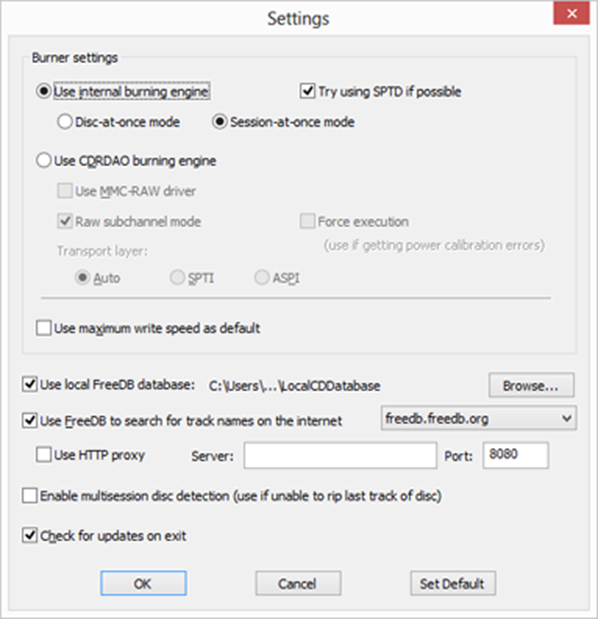
**<span lang="EN-US" style="font-family: 'Arial',sans-serif; mso-bidi-font-family: 'Times New Roman'; mso-bidi-theme-font: minor-bidi; color: black;">Settings</span>**<span lang="EN-US" style="font-family: 'Arial',sans-serif; mso-bidi-font-family: 'Times New Roman'; mso-bidi-theme-font: minor-bidi; color: black;"> dialog box allows to adjust how Power CD+G Burner works.</span>

<span lang="EN-US" style="font-family: 'Arial',sans-serif; mso-bidi-font-family: 'Times New Roman'; mso-bidi-theme-font: minor-bidi; color: black;"><span style="mso-spacerun: yes;"> </span></span>

***<span lang="EN-US" style="font-size: 14.0pt; mso-bidi-font-size: 10.0pt; line-height: 115%; font-family: 'Arial',sans-serif; mso-bidi-font-family: 'Times New Roman'; mso-bidi-theme-font: minor-bidi; color: #333399;">Burner settings</span>***

**<span lang="EN-US" style="font-family: 'Arial',sans-serif; mso-bidi-font-family: 'Times New Roman'; mso-bidi-theme-font: minor-bidi; color: black;">Use internal burning engine</span>**<span lang="EN-US" style="font-family: 'Arial',sans-serif; mso-bidi-font-family: 'Times New Roman'; mso-bidi-theme-font: minor-bidi; color: black;"> enables primary burning mode. It has two operating modes, **Disc-at-once** and **Session-at-once**. Usually Power CD+G Burner automatically selects the best operating mode.</span>

<span lang="EN-US" style="font-family: 'Arial',sans-serif; mso-bidi-font-family: 'Times New Roman'; mso-bidi-theme-font: minor-bidi; color: black;"><span style="mso-spacerun: yes;"> </span></span>

**<span lang="EN-US" style="font-family: 'Arial',sans-serif; mso-bidi-font-family: 'Times New Roman'; mso-bidi-theme-font: minor-bidi; color: black;">Try using SPTD if possible</span>**<span lang="EN-US" style="font-family: 'Arial',sans-serif; mso-bidi-font-family: 'Times New Roman'; mso-bidi-theme-font: minor-bidi; color: black;"> enables SPTD (SCSI Pass Through Direct) layer for device access. It should be used if you are experiencing device access problems or conflicts with other software. Please make sure that you install SPTD when installing Power CD+G Burner, otherwise this option will not be available.</span>

<span lang="EN-US" style="font-family: 'Arial',sans-serif; mso-bidi-font-family: 'Times New Roman'; mso-bidi-theme-font: minor-bidi; color: black;"><span style="mso-spacerun: yes;"> </span></span>

**<span lang="EN-US" style="font-family: 'Arial',sans-serif; mso-bidi-font-family: 'Times New Roman'; mso-bidi-theme-font: minor-bidi; color: black;">Use CDRDAO burning engine</span>**<span lang="EN-US" style="font-family: 'Arial',sans-serif; mso-bidi-font-family: 'Times New Roman'; mso-bidi-theme-font: minor-bidi; color: black;"> enables alternate burning mode and may be used if internal mode is not working correctly. Settings in this section also should be set automatically by the program.</span>

<span lang="EN-US" style="font-family: 'Arial',sans-serif; mso-bidi-font-family: 'Times New Roman'; mso-bidi-theme-font: minor-bidi; color: black;"><span style="mso-spacerun: yes;"> </span></span>

**<span lang="EN-US" style="font-family: 'Arial',sans-serif; mso-bidi-font-family: 'Times New Roman'; mso-bidi-theme-font: minor-bidi; color: black;">Use maximim write speed as default</span>**<span lang="EN-US" style="font-family: 'Arial',sans-serif; mso-bidi-font-family: 'Times New Roman'; mso-bidi-theme-font: minor-bidi; color: black;"> causes Power CD+G Burner to select the highest burning speed available -- this should be fine with most modern drives, but if you prefer to burn at lower speed you may check this option off.</span>

<span lang="EN-US" style="font-family: 'Arial',sans-serif; mso-bidi-font-family: 'Times New Roman'; mso-bidi-theme-font: minor-bidi; color: black;"><span style="mso-spacerun: yes;"> </span></span>

***<span lang="EN-US" style="font-size: 14.0pt; mso-bidi-font-size: 10.0pt; line-height: 115%; font-family: 'Arial',sans-serif; mso-bidi-font-family: 'Times New Roman'; mso-bidi-theme-font: minor-bidi; color: #333399;">FreeDB settings</span>***

<span lang="EN-US" style="font-family: 'Arial',sans-serif; mso-bidi-font-family: 'Times New Roman'; mso-bidi-theme-font: minor-bidi; color: black;">Power CD+G Burner uses FreeDB internet database to retrieve track names. You need to allow Power CD+G Burner to access the Internet (this is if you are using firewall software). If you are getting listings for some discs and others are not displayed, then probably latter are not available in FreeDB database -- it contains many discs, but not all. You may try changing the FreeDB server to Tracktype.org, maybe your disc will be listed there.</span>

<span lang="EN-US" style="font-family: 'Arial',sans-serif; mso-bidi-font-family: 'Times New Roman'; mso-bidi-theme-font: minor-bidi; color: black;"><span style="mso-spacerun: yes;"> </span></span>

<span lang="EN-US" style="font-family: 'Arial',sans-serif; mso-bidi-font-family: 'Times New Roman'; mso-bidi-theme-font: minor-bidi; color: black;">If you are in a network behind a firewall you may need to define a proxy access for FreeDB -- enable **Use HTTP proxy** and enter server name and port number.</span>

<span lang="EN-US" style="font-family: 'Arial',sans-serif; mso-bidi-font-family: 'Times New Roman'; mso-bidi-theme-font: minor-bidi; color: black;"><span style="mso-spacerun: yes;"> </span></span>

**<span lang="EN-US" style="font-family: 'Arial',sans-serif; mso-bidi-font-family: 'Times New Roman'; mso-bidi-theme-font: minor-bidi; color: black;">Enable multisession disc detection</span>**<span lang="EN-US" style="font-family: 'Arial',sans-serif; mso-bidi-font-family: 'Times New Roman'; mso-bidi-theme-font: minor-bidi; color: black;"> should be enabled when ripping discs recorded in multisession mode. If you are unable to rip the last track of the disc try enabling this option.</span>

<span lang="EN-US" style="font-family: 'Arial',sans-serif; mso-bidi-font-family: 'Times New Roman'; mso-bidi-theme-font: minor-bidi; color: black;"><span style="mso-spacerun: yes;"> </span></span>

**<span lang="EN-US" style="font-family: 'Arial',sans-serif; mso-bidi-font-family: 'Times New Roman'; mso-bidi-theme-font: minor-bidi; color: black;">Check for updates on exit</span>**<span lang="EN-US" style="font-family: 'Arial',sans-serif; mso-bidi-font-family: 'Times New Roman'; mso-bidi-theme-font: minor-bidi; color: black;"> will display the prompt to check for the new version of the program when closing down.</span>