# Power SCDG Ripper

# Introduction

#### *<span style="color: rgb(52, 73, 94);">Thank you for choosing Power SCDG Ripper.</span>*

<span lang="EN-US" style="font-family: 'Arial',sans-serif; mso-bidi-font-family: 'Times New Roman'; mso-bidi-theme-font: minor-bidi; color: black;">Power SCDG Ripper<span class="HMNormal"><span style="mso-bidi-font-family: 'Times New Roman'; mso-bidi-theme-font: minor-bidi;"> allows you to save karaoke tracks from SCDG discs to hard drive of your computer.</span></span></span>

<span lang="EN-US"> </span>

<span class="HMNormal"><span lang="EN-US" style="mso-bidi-font-family: 'Times New Roman'; mso-bidi-theme-font: minor-bidi;">SCDG discs contain hudreds of songs. Power SCDG Ripper displays the list of the songs on a disc and allows to select songs you want to copy.</span></span>

<span lang="EN-US"> </span>

##### <span class="HMSubheading"><span>*<span lang="EN-US" style="font-size: 14.0pt; mso-bidi-font-size: 10.0pt; line-height: 115%; mso-bidi-font-family: 'Times New Roman'; mso-bidi-theme-font: minor-bidi;">How to copy songs from SCDG discs in couple simple steps:</span>*</span></span>

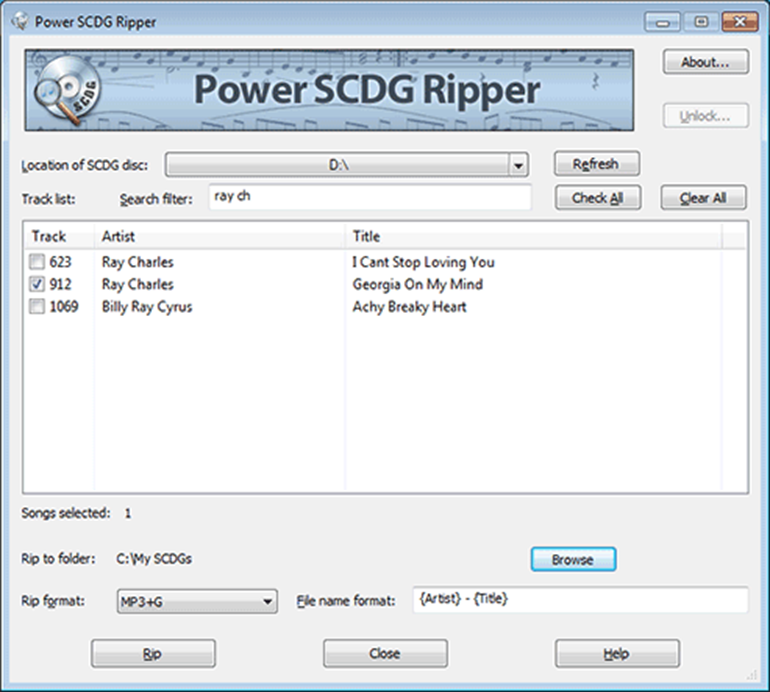
<span lang="EN-US" style="font-family: 'Arial',sans-serif; mso-fareast-font-family: Arial; color: black;"><span style="mso-list: Ignore;">1.<span style="font: 7.0pt 'Times New Roman';"> </span></span></span><span class="HMNormal"><span lang="EN-US" style="mso-bidi-font-family: 'Times New Roman'; mso-bidi-theme-font: minor-bidi;">Start </span></span><span class="HMNormal">**<span lang="EN-US" style="mso-bidi-font-family: 'Times New Roman'; mso-bidi-theme-font: minor-bidi;">Power SCDG Stamper</span>**</span><span class="HMNormal"><span lang="EN-US" style="mso-bidi-font-family: 'Times New Roman'; mso-bidi-theme-font: minor-bidi;">. Main window will appear.</span></span><span lang="EN-US">  
  
</span>

<span lang="EN-US" style="font-family: 'Arial',sans-serif; mso-bidi-font-family: 'Times New Roman'; mso-bidi-theme-font: minor-bidi; mso-no-proof: yes;">![](https://docs.powerkaraoke.com/uploads/images/gallery/2024-08/embedded-image-mzwqz53v.png)</span>

<span lang="EN-US" style="font-family: 'Arial',sans-serif; mso-fareast-font-family: Arial; color: black;"><span style="mso-list: Ignore;">2.<span style="font: 7.0pt 'Times New Roman';"> </span></span></span><span class="HMNormal"><span lang="EN-US" style="mso-bidi-font-family: 'Times New Roman'; mso-bidi-theme-font: minor-bidi;">Insert SCDG disc in CD/DVD drive</span></span><span lang="EN-US">  
  
</span>

<span lang="EN-US" style="font-family: 'Arial',sans-serif; mso-fareast-font-family: Arial; color: black;"><span style="mso-list: Ignore;">3.<span style="font: 7.0pt 'Times New Roman';"> </span></span></span><span class="HMNormal"><span lang="EN-US" style="mso-bidi-font-family: 'Times New Roman'; mso-bidi-theme-font: minor-bidi;">Select the drive letter from a menu using arrow in </span></span><span class="HMNormal">**<span lang="EN-US" style="mso-bidi-font-family: 'Times New Roman'; mso-bidi-theme-font: minor-bidi;">Location of SCDG disc</span>**</span><span class="HMNormal"><span lang="EN-US" style="mso-bidi-font-family: 'Times New Roman'; mso-bidi-theme-font: minor-bidi;">. </span></span><span lang="EN-US">  
</span><span class="HMNormal"><span lang="EN-US" style="mso-bidi-font-family: 'Times New Roman'; mso-bidi-theme-font: minor-bidi;">If you have copied content of the disc to the hard drive, you may use </span></span><span class="HMNormal">**<span lang="EN-US" style="mso-bidi-font-family: 'Times New Roman'; mso-bidi-theme-font: minor-bidi;">Browse</span>**</span><span class="HMNormal"><span lang="EN-US" style="mso-bidi-font-family: 'Times New Roman'; mso-bidi-theme-font: minor-bidi;"> to point to that folder.</span></span><span lang="EN-US">  
  
</span>

<span lang="EN-US" style="font-family: 'Arial',sans-serif; mso-fareast-font-family: Arial; color: black;"><span style="mso-list: Ignore;">4.<span style="font: 7.0pt 'Times New Roman';"> </span></span></span><span class="HMNormal"><span lang="EN-US" style="mso-bidi-font-family: 'Times New Roman'; mso-bidi-theme-font: minor-bidi;">Power SCDG Ripper will read the table of content and display the songs from the disc in </span></span><span class="HMNormal">**<span lang="EN-US" style="mso-bidi-font-family: 'Times New Roman'; mso-bidi-theme-font: minor-bidi;">Track list</span>**</span><span class="HMNormal"><span lang="EN-US" style="mso-bidi-font-family: 'Times New Roman'; mso-bidi-theme-font: minor-bidi;">.</span></span><span lang="EN-US">  
  
</span>

<span lang="EN-US" style="font-family: 'Arial',sans-serif; mso-fareast-font-family: Arial; color: black;"><span style="mso-list: Ignore;">5.<span style="font: 7.0pt 'Times New Roman';"> </span></span></span><span class="HMNormal"><span lang="EN-US" style="mso-bidi-font-family: 'Times New Roman'; mso-bidi-theme-font: minor-bidi;">To copy a track you need to check it. As SCDG disc can contain over thousand of songs, Power SCDG Ripper allows to search for songs using </span></span><span class="HMNormal">**<span lang="EN-US" style="mso-bidi-font-family: 'Times New Roman'; mso-bidi-theme-font: minor-bidi;">Search filter</span>**</span><span class="HMNormal"><span lang="EN-US" style="mso-bidi-font-family: 'Times New Roman'; mso-bidi-theme-font: minor-bidi;"> field. Enter any text there and only songs containing that text will be displayed. You may enter several words and songs containing all of them will be listed.</span></span><span lang="EN-US">  
  
</span><span class="HMNormal"><span lang="EN-US" style="mso-bidi-font-family: 'Times New Roman'; mso-bidi-theme-font: minor-bidi;">You may also sort track list by clicking on column heading.</span></span><span lang="EN-US">  
  
</span><span class="HMNormal">**<span lang="EN-US" style="mso-bidi-font-family: 'Times New Roman'; mso-bidi-theme-font: minor-bidi;">Check All</span>**</span><span class="HMNormal"><span lang="EN-US" style="mso-bidi-font-family: 'Times New Roman'; mso-bidi-theme-font: minor-bidi;"> and </span></span><span class="HMNormal">**<span lang="EN-US" style="mso-bidi-font-family: 'Times New Roman'; mso-bidi-theme-font: minor-bidi;">Clear All</span>**</span><span class="HMNormal"><span lang="EN-US" style="mso-bidi-font-family: 'Times New Roman'; mso-bidi-theme-font: minor-bidi;"> buttons allow to check all songs and clear any checked songs respectively.</span></span><span lang="EN-US">  
  
</span>

<span lang="EN-US" style="font-family: 'Arial',sans-serif; mso-fareast-font-family: Arial; color: black;"><span style="mso-list: Ignore;">6.<span style="font: 7.0pt 'Times New Roman';"> </span></span></span><span class="HMNormal"><span lang="EN-US" style="mso-bidi-font-family: 'Times New Roman'; mso-bidi-theme-font: minor-bidi;">By default songs are ripped to subfolder created in </span></span><span class="HMNormal">**<span lang="EN-US" style="mso-bidi-font-family: 'Times New Roman'; mso-bidi-theme-font: minor-bidi;">Documents</span>**</span><span class="HMNormal"><span lang="EN-US" style="mso-bidi-font-family: 'Times New Roman'; mso-bidi-theme-font: minor-bidi;"> folder. You may change this by clicking </span></span><span class="HMNormal">**<span lang="EN-US" style="mso-bidi-font-family: 'Times New Roman'; mso-bidi-theme-font: minor-bidi;">Browse</span>**</span><span class="HMNormal"><span lang="EN-US" style="mso-bidi-font-family: 'Times New Roman'; mso-bidi-theme-font: minor-bidi;"> button next to </span></span><span class="HMNormal">**<span lang="EN-US" style="mso-bidi-font-family: 'Times New Roman'; mso-bidi-theme-font: minor-bidi;">Rip folder</span>**</span><span class="HMNormal"><span lang="EN-US" style="mso-bidi-font-family: 'Times New Roman'; mso-bidi-theme-font: minor-bidi;">.</span></span><span lang="EN-US">  
  
</span>

<span lang="EN-US" style="font-family: 'Arial',sans-serif; mso-fareast-font-family: Arial; color: black;"><span style="mso-list: Ignore;">7.<span style="font: 7.0pt 'Times New Roman';"> </span></span></span><span class="HMNormal"><span lang="EN-US" style="mso-bidi-font-family: 'Times New Roman'; mso-bidi-theme-font: minor-bidi;">Power SCDG Ripper supports several file formats that you may use for ripped songs. Available formats include MP3+G, ZIP (zipped MP3+G), BIN, and MCG+MP3.</span></span><span lang="EN-US">  
  
</span><span class="HMNormal"><span lang="EN-US" style="mso-bidi-font-family: 'Times New Roman'; mso-bidi-theme-font: minor-bidi;">Power SCDG Ripper reads MP3 files directly from SCDG disc, so the quality of them depends on the original encoding (it is 128kbps for most SCDG discs).</span></span><span lang="EN-US">  
  
</span>

<span lang="EN-US" style="font-family: 'Arial',sans-serif; mso-fareast-font-family: Arial; color: black;"><span style="mso-list: Ignore;">8.<span style="font: 7.0pt 'Times New Roman';"> </span></span></span><span class="HMNormal"><span lang="EN-US" style="mso-bidi-font-family: 'Times New Roman'; mso-bidi-theme-font: minor-bidi;">Power SCDG Ripper automatically creates names for files it writes. You may modify the file mask. Following rules apply:</span></span><span lang="EN-US">  
  
<span style="mso-tab-count: 1;"> </span></span><span class="HMNormal">**<span lang="EN-US" style="mso-bidi-font-family: 'Times New Roman'; mso-bidi-theme-font: minor-bidi;">{Artist}</span>**</span><span class="HMNormal"><span lang="EN-US" style="mso-bidi-font-family: 'Times New Roman'; mso-bidi-theme-font: minor-bidi;"> will be replaced with artist name (artist name has to be separated by '/' \[slash\] from track title)</span></span>

<span class="HMNormal"><span lang="EN-US" style="mso-bidi-font-family: 'Times New Roman'; mso-bidi-theme-font: minor-bidi;"> </span></span><span lang="EN-US">  
<span style="mso-tab-count: 1;"> </span></span><span class="HMNormal">**<span lang="EN-US" style="mso-bidi-font-family: 'Times New Roman'; mso-bidi-theme-font: minor-bidi;">{Title}</span>**</span><span class="HMNormal"><span lang="EN-US" style="mso-bidi-font-family: 'Times New Roman'; mso-bidi-theme-font: minor-bidi;"> will be replaced with title (title has to be separated by '/' \[slash\] from artist name)</span></span>

<span lang="EN-US">  
<span style="mso-tab-count: 1;"> </span></span><span class="HMNormal">**<span lang="EN-US" style="mso-bidi-font-family: 'Times New Roman'; mso-bidi-theme-font: minor-bidi;">{Number}</span>**</span><span class="HMNormal"><span lang="EN-US" style="mso-bidi-font-family: 'Times New Roman'; mso-bidi-theme-font: minor-bidi;"> will be replaced by track number.</span></span><span lang="EN-US">  
  
</span>

<span lang="EN-US" style="font-family: 'Arial',sans-serif; mso-fareast-font-family: Arial; color: black;"><span style="mso-list: Ignore;">9.<span style="font: 7.0pt 'Times New Roman';"> </span></span></span><span class="HMNormal"><span lang="EN-US" style="mso-bidi-font-family: 'Times New Roman'; mso-bidi-theme-font: minor-bidi;">When the songs you need are selected click </span></span><span class="HMNormal">**<span lang="EN-US" style="mso-bidi-font-family: 'Times New Roman'; mso-bidi-theme-font: minor-bidi;">Rip</span>**</span><span class="HMNormal"><span lang="EN-US" style="mso-bidi-font-family: 'Times New Roman'; mso-bidi-theme-font: minor-bidi;"> button. Ripping is usually fast and takes less than a second per song.</span></span>

<span lang="EN-US"> </span>

<span lang="EN-US"></span>